What’s new in Designcenter X NX

The latest version of Designcenter NX is not an incremental update; it's a strategic investment in digital transformation. We are providing the tools you need to compete in an AI-driven, cloud-connected, and model-based future. This new version features a broad set of enhancements in assembly, design, drawings, and user experience. This update focuses on expanding core modeling and construction capabilities, improving drawing creation and control, and continuously enhancing the overall usability of the browser-based experience. All new capabilities are underpinned by 4 fundamental pillars. These four pillars are:

The 4 Pillars
Designcenter X NX – Offering a Complete Collaboration Solution
We are living in an era of transformation, in which global companies are migrating to Software as a Service (SaaS) models. There is a real desire in the industry to reduce time to market, manage increasing complexity, and ensure a simplified IT strategy to enable instant connectivity. Siemens research indicates that SaaS models result in a 19% increase in productivity and an almost 100% increase in uptime and reliability.

Therefore, investment continues in the Designcenter X NX strategy to create a truly collaborative environment for users. Designcenter allows you to design for the future, whether through a browser or on a computer, offering unparalleled flexibility. It is the most complete and uniquely scalable environment for product development, with best-in-class product engineering software.
Introducing Live Share
Let's take a closer look. Cloud collaboration for globally distributed teams is fundamental as companies continue to migrate to a hybrid work model. There is a huge demand for companies to be able to work on product development in real time.
Live Share enables real-time collaborative creation while preserving industry-proven security and business logic. With it, multiple engineers can work simultaneously on the same assembly or part in real time. Furthermore, it works with data managed both in the cloud and by Teamcenter® software. Live Share enables true concurrent engineering, reducing project cycle time by 30-50% and eliminating costly delays.
Automation with Artificial Intelligence
The power of Artificial Intelligence continues to transform the competitive landscape for engineers worldwide. AI is the primary area of technology investment for manufacturers. New AI capabilities are reducing the need for repetitive tasks, accelerating the work of design engineers and freeing them to focus on innovation instead of manual operations. Early adopters of AI technologies report time savings exceeding 40% on common tasks, which is why it's at the heart of the continuous rollout strategy.
Here are some of the new AI-based workflows in the latest version of Designcenter NX.
Designcenter X NX Copilot
Designcenter X NX Copilot is the engineering-focused generative AI assistant that brings innovation to life by transforming natural language into action. The new tool leverages industry best practices and Siemens' expertise to guide users through complex tasks with knowledgeable and informative responses. With Copilot, you can ask questions in plain language and everything will be translated into area-specific commands, assisting with everything from best design approaches to troubleshooting errors.
The benefits are real; Copilot reduces the time and effort spent on complex tasks, streamlining workflows and making Designcenter X NX more accessible and user-friendly, especially for new users looking to unlock more features.

CAD interface with mechanical model and Copilot displaying suggestions
Digital Threads
Let's take a look at digital threads and where this version focuses.
New features for the Design for Manufacturing (DFM) Advisor

DFM Advisor is a design-to-manufacturing application that provides critical information about part production during the design phase. It's a new application developed to identify problematic and high-cost manufacturing areas in any design model.
For the new version of Designcenter NX, additional checkers have been added to support various manufacturing methods, including milling checkers, assembly checkers, and sheet metal checkers.
New Ship Structure Capabilities
Ship Structures is a highly productive and collaborative environment for modeling naval structures. With complete coverage of naval design workflows at all design stages, you can reuse design data for subsequent production information and drawing generation.
New tools to enhance workflow support from production information to design, along with significant performance improvements and AI tools, have resulted in a 20-30% increase in performance for section views and updates.

Ship sructure in the Ship Structures environment
Design for Sustainability in Designcenter NX
Finally, let's talk about the productivity gains associated with sustainability. Design for Sustainability is an application developed specifically for this purpose, which integrates sustainability into product design in a transparent way. It allows for data-driven decision-making through advanced visualization and reporting, enabling real-time environmental impact assessment.
Furthermore, Design for Sustainability can be integrated with coatings and manufacturing to ensure that all sustainability goals are aligned with production efficiency.

The Importance of Immersive Engineering
Next, we will highlight the new features added in conjunction with immersive engineering. Immersive Engineering continues to transform the way engineers create products. It's a product for the future, allowing everyone to experience digital twins naturally in an immersive environment. A product not limited to a single sector, it's a tool that offers the only fully integrated XR CAD environment, meaning you can stay in your usual engineering application and ensure the security of your data. It's an award-winning solution, designed by engineers, for engineers.
Live Updates in Immersive Collaborative Meetings
The Immersive Engineering offering is being enhanced through Immersive Collaborator. Immersive Collaborator adds real value and facilitates decision-making by enabling live updates and design changes during meetings. Changes made by the session host are communicated to other users so they can observe and interact.
Real-time updates are enabled for Animation Designer, Mechatronics Concept Designer (MCD), and other compatible design operations. This represents a true revolution for simulations and design changes, particularly in identifying collisions and the need to make rapid changes.

Cyclist analysis with aerodynamic simulation in a virtual environment
Expanded assembly capabilities in NX

Centering Constraint. Position components in an assembly by centering them between two faces.
Assembly workflows receive several important additions in this version, primarily regarding positioning, movement, and visualization.
New constraint types, including center constraint, cylindrical joint, and sliding joint, expand the possibilities for defining and defining component behavior in an assembly. This allows for more realistic movements and positioning, such as allowing rotation and translation along a common axis or restricting movement to a single direction.
To facilitate the visualization and communication of assemblies, a manual explode function has been introduced, allowing users to move and rotate components using the Intelligent Triad. This function can also be used to automatically refine exploded views.
Additional improvements include the ability to copy components directly from the Assembly Browser using drag-and-drop workflows, expanded access to standard parts in various global standards, and improved performance when working with large assemblies.
Faster and more flexible design workflows

Delete Body. Removes bodies from the model associatively in the history tree. This feature can be suppressed to resurrect bodies.
Design improvements in this version focus on making it easier to create, modify, and manage geometry, reducing difficulties.
New features, such as the sketch pattern, allow users to quickly replicate geometry in linear or circular arrays, while the sketch chamfer adds more control when defining details at the sketch level.
Model editing has also become more flexible with the addition of "delete body" and "delete face" options, which allow users to remove geometry while maintaining associativity in the history tree. These features can be suppressed to restore geometry if necessary.
The main modeling commands have also been expanded, with extrude, revolve, and face replacement now supporting draft and thickness parameters. Updates to the shell command provide greater control over the direction of displacement, and enhancements to the query command facilitate access to detailed face information, such as surface area and centroid.
More complete and customizable drawings
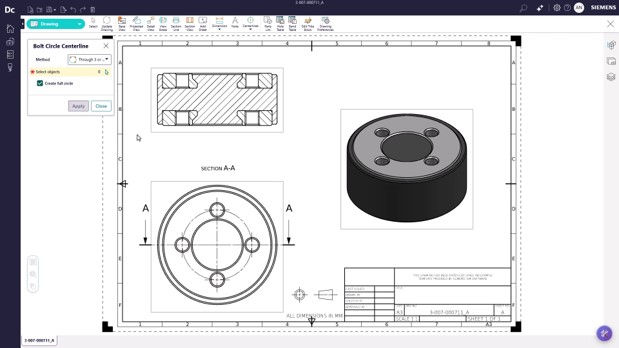
Center mark, centerline, and primitive circle diameter. Use these annotations in drawings to communicate design intent, locate elements, and manufacture parts with precision.
Drawing functionality has been significantly expanded to support more comprehensive documentation workflows.
Users can now edit embedded drawings directly within the same NX part file, simplifying transitions between modeling and detailing. New layer controls allow for better management of drawing visibility and selection, helping to reduce clutter.
Several new annotation and detailing features have been introduced, including center marks, centerlines, and primitive circle diameter annotations, along with expanded control over dimension and annotation settings.
For sheet metal workflows, the addition of a bend table allows for the inclusion of specific manufacturing information, such as bend radius, angle, and direction, directly in the drawing.
Additional updates to drawing view settings, preferences, parts lists, and hole tables provide more flexibility and control, helping teams align results with internal standards.
Continuous improvements to usability and user experience

Version Update Notification. Receive automatic notifications whenever the product is updated, with a link to information about the new features.
This version also introduces several updates designed to improve usability and make the application more intuitive.
Users can now select user profiles to align mouse and keyboard behavior with NX or other conventional CAD systems, reducing the learning curve. Dependencies between features are now easier to understand thanks to visual highlighting in the history tree, and direct sketch editing allows users to quickly modify geometry without having to navigate through features.
Additional improvements include version update notifications, product version visibility, improved file path access, and simplified workflows for opening files, contributing to a smoother daily experience.
The new 2026 version of Designcenter X NX brings significant advancements that make your engineering processes more agile, precise, and intuitive—from assembly to final documentation. Want to understand how to apply these improvements to your daily work and extract maximum value from the tool? Schedule a meeting with CAEXPERTS and discover, in practice, how to optimize your workflows and elevate the level of your projects with NX.
WhatsApp: +55 (48) 98814-4798
E-mail: contato@caexperts.com.br


